 Screen Divider
Rectangle vs Magnet: which Mac window snapper should you use?
Rectangle and Magnet are the two names that come up first when someone asks how to snap windows on a Mac. They overlap more than they differ. Here’s an even-handed side-by-side, so you can pick in a minute.
Checked on October 20, 2026: Rectangle on rectangleapp.com and its GitHub README; Magnet on magnet.crowdcafe.com and its Mac App Store listing. We make Screen Divider, a third option covered at the end; we’ve kept that out of the comparison itself.
The short answer
- Pick Rectangle if you want free, open source, and lots of keyboard actions, or you’re on an older version of macOS.
- Pick Magnet if you’d rather buy from the Mac App Store, want to define your own snap commands without paying for a “Pro” tier, or want your settings synced over iCloud.
Both snap windows to halves, thirds and quarters, both let you drag a window to a screen edge or corner, and both work with external and vertical displays. For most people either one will do the job well.
Side by side
| Rectangle | Magnet | |
|---|---|---|
| Price | Free, open source | $4.99 one-time (Mac App Store) |
| Where to get it | rectangleapp.com, GitHub, or Homebrew | Mac App Store |
| Keyboard shortcuts | Yes, customizable; repeat a shortcut to cycle sizes | Yes, customizable |
| Drag to edges and corners | Yes (snap areas, can be turned off) | Yes (trigger areas, customizable) |
| Halves, thirds, quarters | Yes | Yes |
| Your own sizes and positions | Built-in sizes plus “Extra Shortcuts” in settings; fully custom sizes are in Rectangle Pro | “An infinite number of custom commands” |
| External and vertical displays | Yes, portrait layouts supported | Yes, up to six external displays |
| Settings sync | Import/export a JSON file (iCloud sync is in Pro) | iCloud (optional) |
| Latest version | 2.0.3 (October 2026) | 3.0.7 (April 2025) |
| macOS | 14+ for current releases; older versions for 10.13–13 | 13 Ventura or later |
| Spectacle shortcuts | Selectable on first run | No |
Where Rectangle wins
Price and openness. Rectangle costs nothing and its code is public. It’s actively maintained: version 2.0.3 came out in October 2026, and recent versions added actions that tile all the windows on a display into rows or columns. Keyboard depth. Repeating a shortcut cycles through sizes, so you memorize fewer keys. Older Macs. The README keeps download links for older macOS versions back to 10.13, which Magnet’s current version doesn’t cover. Coming from Spectacle? Rectangle grew out of it and can use Spectacle’s shortcuts; see what to use now that Spectacle is discontinued.
Where Magnet wins
Custom commands without an upgrade. Magnet’s App Store listing promises unlimited custom commands and “widely configurable layout properties” for a one-time $4.99, with no subscription and no in-app purchases. In Rectangle, custom sizes and positions are part of the paid Rectangle Pro (US$9.99 with a 10-day trial when we checked on October 18, 2026). More ways in. Magnet can be driven from trigger areas, shortcuts, the green button menu or the menu bar. iCloud sync for your settings is built in. App Store convenience: updates and licensing go through your Apple account.
One thing to know: Magnet’s last update on the App Store was version 3.0.7 in April 2025, while Rectangle updates more often. That doesn’t mean Magnet is broken (it lists support for macOS 13 to 15), just that Rectangle moves faster.
What neither does
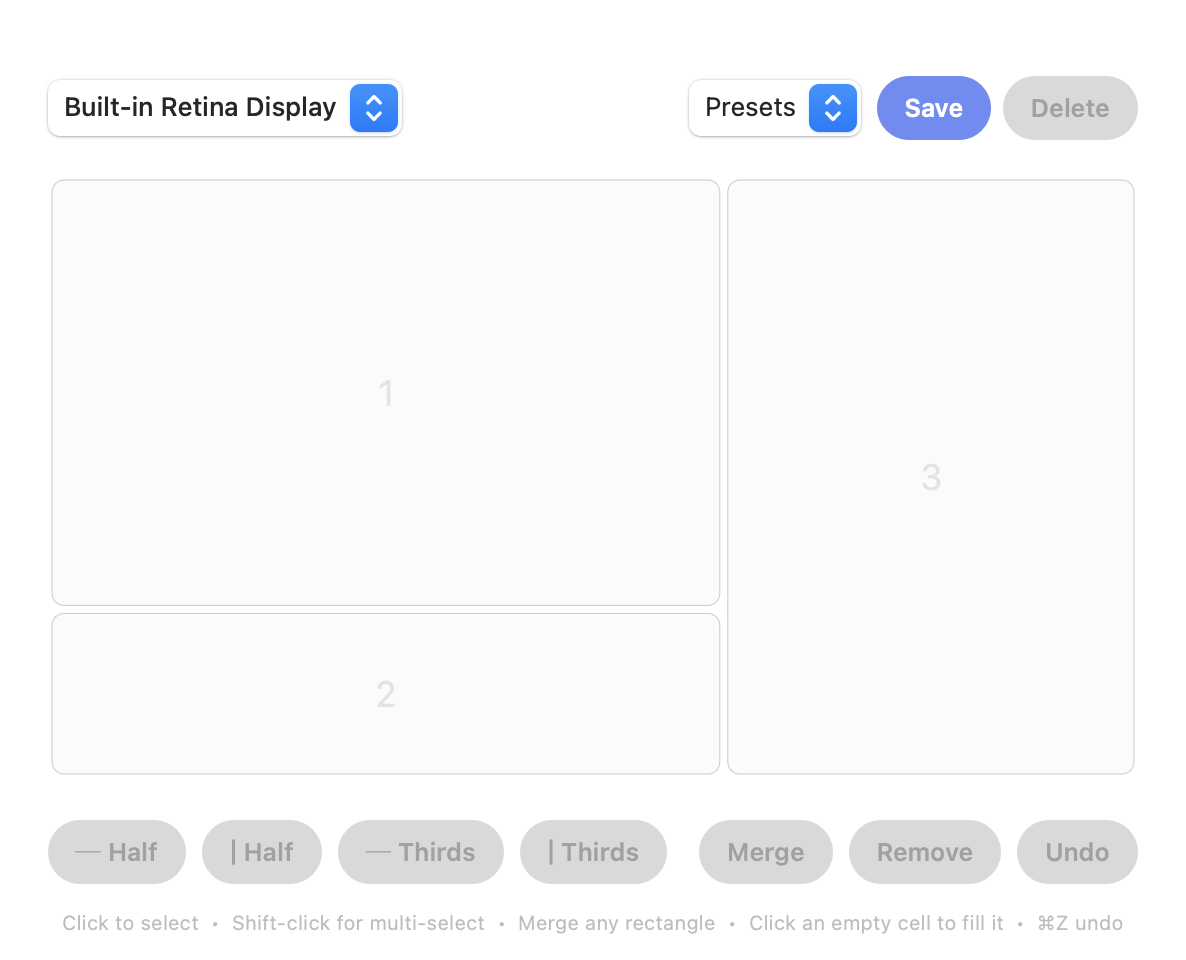
Both are built around preset regions of the screen: halves, thirds, quarters, and in Magnet’s case commands you define. Neither gives you a visual editor where you draw a grid and merge cells into odd-shaped zones, like a wide main area on top with two short panels underneath. If that sounds like your layout, keep reading.
A third option: Screen Divider
Screen Divider is our app, so weigh this accordingly. It takes a different approach from both: you split the screen into a grid in a visual editor, merge adjacent cells into any rectangular zone, then drag windows into those zones to snap them. Each display keeps its own layout. It’s $12 once, for macOS 13 Ventura or later. It’s drag-first; if keyboard shortcuts are how you work, Rectangle or Magnet will suit you better.
Our longer one-on-one comparisons: Rectangle and Rectangle Pro vs Screen Divider and Magnet vs Screen Divider. New to window management? Start with how to snap windows on a Mac, which covers what macOS does on its own.
FAQ
Is Rectangle better than Magnet?
They do the same core job: snap windows to halves, thirds and quarters by shortcut or by dragging to an edge. Rectangle is free and open source; Magnet costs $4.99 once and adds unlimited custom commands and iCloud sync. If the presets cover you, Rectangle is the easy pick.
Is Magnet a one-time purchase?
Yes. On the Mac App Store Magnet is $4.99 with a perpetual license, no subscription and no in-app purchases (checked October 20, 2026).
Can Rectangle do custom window sizes?
The free app sticks to its built-in sizes and positions, with some extras you can add in settings. Custom shortcuts for any size and position are a Rectangle Pro feature.
Which one works on older macOS versions?
Rectangle. Its README says current releases need macOS 14, but it keeps older versions for macOS 10.13 to 13. Magnet’s current version requires macOS 13 Ventura.